Free!
Get pollen and air quality for your Strava activities
- Download the Airmine Pollen app (free)
- Connect it with Strava
- Go outside and log your activities
- Pollen and air quality data will automatically appear on your Strava activity
Explore air data to boost your performance
Local pollen risk and air quality give you a powerful tool to understand how environmental factors affect your performance. By comparing sessions where your performance dropped with periods of high exposure, you may uncover patterns that impact your endurance, recovery, and overall well-being.
Use the air data to:
- Assess how high levels of pollen and air pollution might reduce performance and increase fatigue.
- Opt for indoor workouts or lower-intensity sessions when pollen spikes or when the air quality is poor.
- Monitor how your body responds to medication or other strategies.
- Recognize when extra rest or hydration is needed after high-exposure sessions.
Use the insights to boost performance and reduce setbacks.
How Airmine works with Strava
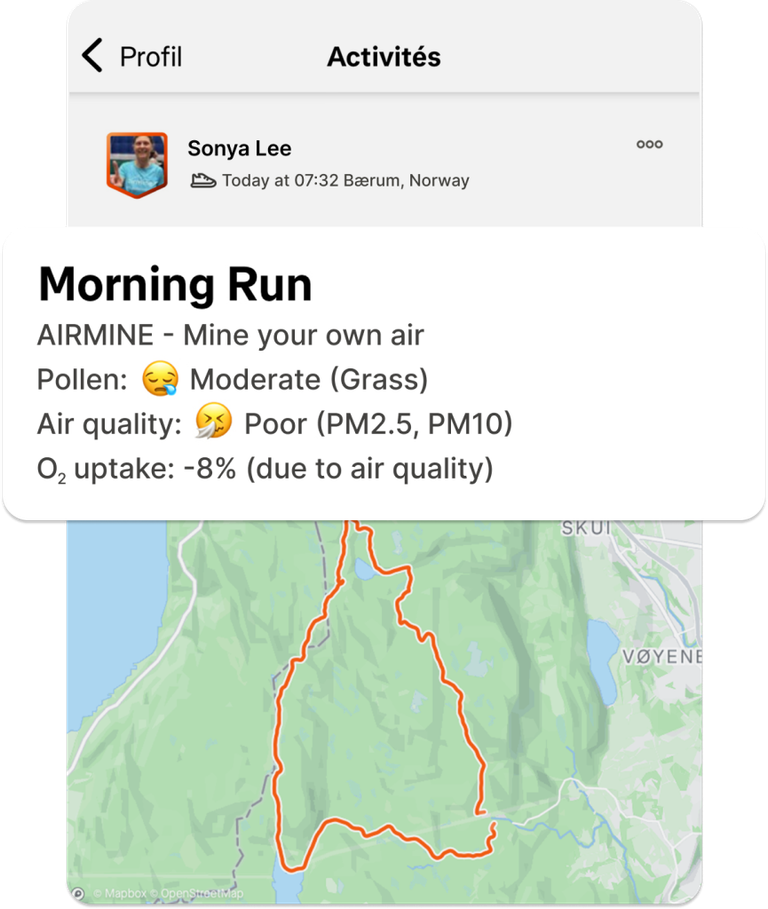
When you connect the Airmine Pollen app with Strava, we automatically calculate your pollen and air quality exposure for each of your activities. For every step of your route, Airmine estimates the pollen risk and air quality, showing how environmental conditions may affect your performance.
Scientific studies have shown that pollen and poor air quality can reduce lung capacity and slow you down. That’s why Airmine also estimates the performance impact of these factors along your route.
For runs and trail runs, we display your adjusted pace, an estimate of what your pace would have been without pollen or air pollution. At the moment, adjusted pace is available only for runs and trail runs (not for cycling or other activities). For these, we instead show the likely effect on oxygen uptake.
You’ll also see:
- The highest pollen level along your route
- The average air quality
- The main vegetation behind the pollen
- The key pollutants contributing most to air quality levels
NB! Pollen levels and air quality are only visible on activities where visibility is set to “Followers” or “Everyone”.
How to set up the integration
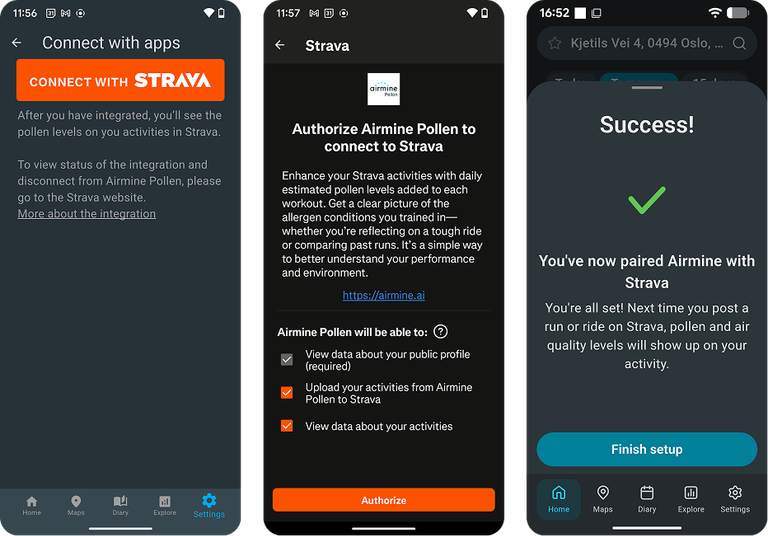
- Install the Airmine Pollen app
- In the Airmine Pollen app, Go to ‘Settings→Connect with apps’
- Click on “Connect to Strava”
- You’re ready to go!
How to manage or remove the integration
To view the status of the integration and disconnect from Airmine Pollen, please go to the Strava web page. On the Strava website, go to Settings->My Apps. Here you should see “Airmine Pollen” in the list of apps, and you can remove the integration (revoke access).
What do the emojis mean?
The emojis we post on your Strava activity represent levels of pollen risk and air quality:
😱 Very high pollen risk/Very poor air quality
🤧 High pollen risk/Poor air quality
😪 Moderate pollen risk/Moderate air quality
😐 Low but not insignificant pollen risk/Fair air quality
😀 None or very low pollen risk/Good air quality
What is O2-uptake?
Poor air quality and pollen will affect your respiratory capacity, VO2max. In the Strava-posts we denote this as O2 uptake, and provide the percentage reduction of VO2max when the air quality is not good. Since the effect of pollen depends on the extent a user is allergic, we do not calculate the respiratory effect of pollen. (More on how air quality affects O2-uptake)
Join the Airmine club on Strava!
You find us here: The Airmine club
Coverage and limitations
- Air Quality has global coverage
- The pollen service currently covers Europe, USA, Canada, Australia, Indonesia (Java & Bali), South Africa, Brazil, Uruguay, Paraguay and the area around Buenos Aires.
- Pollen levels and air quality are not provided when old activities are uploaded in Strava.
- Pollen levels and air quality are not provided when gpx-files are uploaded manually.
How do we handle your personal data?
We do not store your activities after processing. When you integrate with the Airmine Pollen app, we will ask for permission to read and write to your activities. We do not have access to your privacy zone data (visibility set to Only you).
If you remove the integration, we will delete all data related to the integration in our systems. Please also refer to our Privacy policy.
Questions or comments?
We are happy to hear from you! Please contact us at info@airmine.ai.